Most solopreneurs launch their small business from home or other handy locations such as a coffee shop, library, or even your car! This workplace environment can be a new experience for many federal workers. While pandemic teleworking has given many feds a good idea of working from home, managing the total freedom of a home-based small business presents new challenges. The SOHO (Small Office Home Office) experience often involves juggling marketing vs client engagements, business focus vs family commitments, let alone the occasional visit of a plumber or electrician.
Following are a variety of tips on how best to organize the newfound freedom of a home- based small business:
SOHO Management Tips
Create SOHO Spaces:
A designated space is useful for your home office. My main office area with PC and files is in our townhouse loft, separated from household demands by a flight of stairs. But sometimes I work from my wife’s downstairs office, when I need to be more accessible for everyday home billing or errands. It is also handy to learn how to work in short spurts around the house – at the breakfast table, dining room or even in bed.
Keep personal vs business accounts and records separate from personal, household filing. Use an app like Google Workspace to separate online client projects from personal email and file drives. Good record-keeping comes in handy for calculating your net income from the business, as well as tax reporting.
Set a Schedule…with Exercise: Early morning (or late!) exercise or a visit to the gym/trainer can both energize your day, and provide some disicipline for your solo workweek. As just one example, I make a gym reservation to swim early Mondays and Fridays, with walking outside or gym workouts on other days. When your Solopreneur work is interrupted by long vacation trips (or even hospital stays!) , draft and schedule publication of a series blog and social media posts ahead of time.
Prioritize your Tasks: Pick and choose outside marketing and client appointments, just as you prioritized meetings in a federal work environment. I keep a small paper notebook, where I typically draft a To Do list for the day, plus job down notes and ideas. You can also use your smartphone.
Concentrate as you Can: It is difficult to concentrate on general communications or marketing at home when family can intrude with a more pressing household crisis, task or errand. Learn to juggle such interruptions during the day, and/or try early rising to allow quiet time to concentrate.
Think On-the-go: Try voice memos or notes on your phone, or “back of the envelope” (literally, on an envelope!) scribble of business ideas – these tasks can be done anytime and anywhere. Also consider using ear buds to listen to podcasts while in your car or on-the-go. Make AI, and specifically ChatGPT, your virtual assistant (at your home PC, or by smart phone on-the-go) for research, testing, and new contacts.
Work Off Site: On errands, “negotiate” a division of labor with your spouse or significant other. Try and carve out time (at least 90 minutes) with a laptop at the local library, coffee shop, or even supermarket (Wegmans, for example, has a large cafe area where you can settle down with a laptop).
Get Dressed!: If you are full time, try and keep a 9-5 schedule in business casual attire rather than pijamas. PJs are OK for some early morning brainstorming, but best to shower and dress for most of the day.
Log your Work: Whether part-time or full-time, try and keep a log of number of hours worked, and on what type activity (client assignment, marketing, tech infrastructure updates, etc). Such a log is useful in calculating realistic, annual billable hours (vs other hours for personal time (vacation, sick days) or business administration and marketing. The goal is a sustainable schedule! I try to log 20 hours over a 7 day week.
Market Everywhere: Where appropriate, introduce marketing into some hobby or everyday activities. For example, I practice some marketing presentations at my Toastmasters Club, and learn applicable management tips at my Leadership group seminars. You might even try adversiting your business on a T-shirt at your gym!
Get Feedback: Meet in person or on Zoom with business colleagues to test out business ideas. Also include your family in key business decisions or feedback on the occasional blog post – both for constructive criticism, and to make sure your work-life balance is on track!
Update your Tech: Keep your SOHO tech up-to-date: phone, PC, tablet – to ensure audio/video quality, etc. If an interest in podcasting, consider investing in a stand-alone mic. Blue Yeti is a good brand at a reasonable price.
Dip into Social Media: Build checking into social media as part of your daily home routine. Social media, esp Linkedin, is like a river – dip into it when you can to get news, learn new tech, get updates on colleagues…and informally market your brand.
Focus on Personal Branding: Focus first on yourself and your personal branding style. Collaboration with outside partners or vendors can come later.
Build community engagement – school interns, charitable events, business ribbon-cuttings – into your business model. Local Chamber of Commerce membership can be a helpful gateway into such activities, and your business home (and fellow peeps!) away from home.
Have some fun!. For example, I make time to participate in annual book fairs (the Fall National Book Fair in DC, and the Spring Gaithersburg MD book fair), Toastmasters Zoom meetings, and a periodic lunch with my best friend in the DC area. I also do various family events and outings, including get-to-togethers at local wineries and breweries.
My SOHO Resolutions for 2026:
Become an Affiliate marketer for any brands I use and trust – for example, WordPress.com or GoogleWorkspace.
Include contacts in an Email newsletter, and use an organizing app like Mailchimp
Try a personal promo video – check out imovie software by Apple or its equivalent
Market my business at my local gym with a custom T-shirt!
Summary FAQs:
1. What is the greatest obstacle to solopreneur success?
Discovering your true market niche. A recent CB Insights report ranks unresponsive market as the top reason (34%) for small business failure. I use techniques such as value proposition to help clients match their expertise with target customer needs.
2. How soon might my solo venture become profitable in the DMV?
Plan at least a year for transition from government service to a solo small business. Profitability will depend on the marketability of your business idea, personal networks for initial sales, and keeping start-up costs at a minimum as a home-based solopreneur.
3. What are estimated start-up costs for a home-based solopreneur in consulting and other services?
Plan around $1,000 to update your home computer, preferably a laptop as you will be on-the-go. And another $1,000/year for software, home office supplies, and event travel and registrations. An additional cost will be for income taxes on net earnings, as well as a 12.5% self-employment tax as an independent, sole proprietor!
4. How much time should I budget as a part-time solopreneur?
Target around 20 hours per week, with at roughly half for marketing/administration and the other half for billable time with clients. You will need to set your own rhythm for consistently focusing time for your small business amidst competing family, maintenance, doctors appointments, and other distractions at home.
5. In your experience, what is an unexpected side-benefit of becoming a solopreneur in the DMV?
Local community engagement! In marketing your services and in meeting peers at a local chamber of other business organization, you get to know your neighbors, participate in community events, and contribute to local charities and non-profits.
6. What are your best self-help resources for a new solopreneur?
Online: At SCORE check out a small business webinar, course or mentor (a mix of free and low cost resources) and use a free AI tool such as ChatGPT to answer questions, test business ideas and generate marketing images.
In person: join a local chamber of commerce (see this US directory of chambers, or GGCC as just one example in MD) which provides professional development, business leads and local community engagement.
7. Who are your Target Clients for part-time Solopreneur startups?
At DCWebrevolution, my focus is on DC Solopreneurship for early retirees, but I also help mid-career government professionals where part-time solopreneurship can complement their job search and other income sources. For more information, contact me at gary@dcwebrevolution.com.
Following is my checklist of Solopreneur strategies and startup tips for federal workers in 2026. Government contracting is a logical Solopreneur step for former feds. But it is a crowded market, and one in some cases where entire agencies (and their support contracts) have been decimated.
Private Solopreneurship is another good option for feds. But given the long transiton from the public sector to a highly competitive market, a solo enterprise should not be your primary income source, at least not for a few years. In fact, government professionals might want to consider part-time soloentrepreneurship, either as a complement to a job search if mid-career, or as a way to stay engaged as an early retiree apart from personal and family activities..
To give you some ideas of broad private sector possibilities, check out the wide variety of small business options shown in the Membership Directory of the Gaithersburg-Germantown Chamber of Commerce. It is easy to scan the directory by business category. Service businesses range from accountants and lawyers to property managers and wedding planners, and the great majority are solopreneurs.
Defining your business:
Define early what kind of Solopreneur are you? Part-time or Full-time, Midcareer or Retirement, Probono or commercial venture, Temporary complement to a job search or a long-term small business enterprise?
Do a Google Search (and Google Trends) to see who is offering a similar service, especially in the Washington DC area. Also scan short-term tasks or “gigs” on the popular Fiverr freelance platform to see how others pitch and price their services – it’s a very competitive global marketplace!
It is critical to target what your customers want vs merely projecting what you provide! Strategyzer’s Value Proposition Canvas can be a valuable tool here.
A one page business plan is an essential early foundation. Checkout a good, one-page template in Strategyzer’s Business Model Canvas. Get from SCORE Jennifer Dawn’s recorded 1 Page Business Plan webinar, with 7 step questions to clarify your Solopreneur purpose, offer and next steps.
Early formation of your enterprise involves the practical steps of a legal name registered with your state, type organization (sole proprietor or LLC), and setting up a bank account to separate business vs personal transactions.
Slide presentations before groups can help “reality-check” your solo service offering before target audiences, plus provide video content that can be parsed for later use on your social media and website.
Whether full-time or part-time, a solopreneur’s work needs to be balanced with family and other commitments. A daily schedule plus flexibility helps.
Keeping up professionally
Participate in occasional live events to refresh your knowledge at one point in time. Two examples I am familiar with are the annual SBA/SCORE’s Small Business Week with Virtual Summit each May , and NTEN’s annual, paid non-profit technology conference each spring.
Continuing education is critical preparation: webinars, courses, certifications. Two good local DMV non-profits that offer free, periodic webinars for career changers and would-be entrepreneurs are Boomerworks and 40 Plus of Washington DC.
Depending on your skill area, there are likely professional associations or informal Meetup groups that offer periodic online webinars or occasional in-person meetings or conferences. One example from my experience is the DC Project Management Association, and the annual DC Project Management Day of Service, where volunteer PMs help DMV-area non-profits define problems and craft business plans.
Marketing Tools
Brainstorm early branding by assembling images on a Moodboard, on Pinterest or Canva– it’s fun! Looka’s Logomaker is another user-friendly tool for creating your logo, and you can even use ChatGPT to create your custom logo (or even a mock-up business card!) based on prior business goals, content and style as uploaded onto this AI tool.
Focus on LinkedIn (LI) as your primary social media outreach, with short, daily looks and engagement. LI is key for professional services – other social media can be added later.
Use a “content calendar” to plan and prioritize your social media and website posts. While paid tools are available, a simple approach is to use a spreadsheet.
Crafting and refining simple tools like value proposition, elevator speech and a business card can help you quickly and cheaply focus your solo goal and marketing message. See Vistaprint for simple business card templates (printing at extra cost). Once you have added some basic queries about your small business goals, content and style, ChatGPT can also generate a good initial design for a business card.
AI, and spedifically ChatGPT, is an excellent, free research and testing tool. While a welcome “virtual partner”, AI cannot replace your insight and judgment as a solo consultant and expert.
Your personal branding and promotion is important, and a new experience for most feds. Simple online tools can design logos, flyers and even videos. Canva is a user-friendly and powerful digital marketing tool, with free and paid versions.
Experiment with offering fixed pricing and packages as well as limited discounts, and free, initial phone consultations.
Use simple, free website building software such as WordPress.com, Google Sites and Go Daddy to frame and control your solo service and “story”. But any web-builder has a learning curve and can come later in your online promotion.
Community Support
Volunteer and contribute to local charity and community services. Treat such engagement not as a separate “add-on” but as an integral part of your small business success.
Volunteer your professional services to test their value. Checkout such platforms as Taproot Plus and Catchafire, which list non-profit projects for whom you can offer up your probono help. Tasks run from a week to a few months.
Explore other professional and community support organizations such as a local Toastmasters Club (public speaking), Rotary Club International (professional networking charitable service) and events and resources at your free local library.
You will benefit from a new private sector support organization to replace your former government or corporate home. Consider joining a local chamber of commerce or other small business organization such as Business Network International (BNI).
As a member of our Membership Committee, I am happy to accompany you to any Gaithersburg-Germantown Chamber of Commerce ribbon-cutting, charity or networking event – contact me at gary@dcwebrevolution.com. While there may be a small registration fee, this is an informal visit, with no commitment, and will give you a feel for what small business support (and community engagement!) is provided by a local DC area chamber of commerce.
As a tumultuous 2025 has drawn to a close, let’s take stock of the employment challenges and opportunities facing current and former Government professionals in the Washington DC area for 2026. I will share what I have learned from my own post-retirement, public-private sector transition, and I look forward to learning from readers’ own comments and experiences in the process…in fact, I have already gotten many of your stories by following colleagues on Linkedin!
In this three-part series, my focus will be on solo entrepreneurship options in Government consulting and business services, plus tips (and related resource links) on planning, digital marketing and local support resources for solopreneurs in the DMV. I will also examine platforms to volunteer across the US in the non-profit sector, where government professionals can readily apply their expertise in planning, program management and service delivery, and even membership in non-profit Boards of Directors.
An added benefit of launching a solo business (SOHO) is reengaging with your local community. For those of us who have commuted to jobs in downtown DC for years it has been easy to “fly over” the communities we live in! In owning a small business I have learned how to reconnect with charities, schools and local government where my family and I live, in large part through membership and support by the Gaithersburg-Germantown Chamber of Commerce (GGCC).
I will offer some time management tips in running a solo business from home and based on my and other’s experience. A footnote in this series will be how AI tools such as ChatGPT can play a useful research, design and “testing” role, and act as a “virtual partner” with the solopreneur.
Lastly, you do not need a big budget to launch a SOHO consulting or other service-based business. Perhaps your biggest expense will be in upgrading your home computer, plus other small fees for software, home-office supplies, and local transportation. Most online social media, marketing, research or support resources or at free or nominal cost. Your biggest “cost” will be your in-kind hours spent in forming, managing and marketing your business!
My perspective:
Just a few words on my own career and perspective for this article:
My first job out of grad school was as a credit analyst at Mellon Bank in Pittsburgh. That preparation served me well when I became a Peace Corps Volunteer with Colombia’s small business program. PC service then helped me join USAID for a long Foreign Service career as a Program and Project Manager. In my last years at USAID I became interested in knowledge management, a good segue in 2006 to IT contract work with the State Department, where I supported SharePoint and WordPress website applications.
I left full-time work at State in 2022, my second “retirement”, joined the local Chamber in Germantown, and began part-time consulting – initially in website design and digital marketing, and more recently, a rebranded focus on advising new Solopreneurs in the DMV in business planning, web and social media promotion, and personal marketing through business support organizations.
Apart from activities with family and friends, and some occasional overseas travel, I also have carried over some hobbies and pursuits from my workaday life: biweekly meetings with a State Toastmasters Club, monthly Leadership group seminars (with the Virginia-based Leadership Breakfast), and continuing education to maintain my PMP project management certification.
My hope in writing this blog post series is to share a variety of free tips, resources and lessons learned to enable you to “make the leap” into solopreneurship, which I have found to be both challenging and rewarding!
Regional and Global Impact
The Washington Informer cites a recent Brookings study on the 2025 Trump Administration job cuts: the DMV lost 4.5% of its federal work force in the first six months of 2025, or roughly 17,000 jobs. Another WUSA9 article estimated a total of 50,000 jobs lost in all of 2025, including private contractors. In a regional economy dominated by the federal workforce most of these losses were well-paid professionals in such fields as policy analysts, program managers, IT experts, acquisition specialists, scientists, administrative professionals and lawyers. The Administration’s down-sizing has also had a broader impact of the regional economy – for example a 64% upsurge in home sales since last June.
In October 2025 the Metropolitan Washington Council of Governments and its partners launched Talent Capital in an attempt to marshal local resources to help professionals find jobs in the area. The initiative combines trusted employer networks with Celeste, its advanced AI Agent, to match job-seekers’ skills with opportunities in DC, MD, and VA instantly. The site also lists free coaching and employer-vetted training from various Partners.
The Economist Cover: November 2025
Government professionals also face major global change and uncertainty. In its November 2025 issue, The Economist shared its 2026 World Ahead report, and an apropos cover image of a circular vortex with missiles, currencies, politicos etc. In his Medium summary of the report (see Economist World Ahead: Decoding the Signals of a Restless Year), Andrea Belvedere concludes that 2026 “is not the year of collapse, but of recombination. Crises will overlap, alliances will mutate and technologies will negotiate their power…and in 2026, adaptation is power.” In one cautious note of optimism, he states that “complexity isn’t chaos. Its a sign of systems evolving.”
Solopreneur Questions…..
In these articles I will try to address some key first-time Solopreneur questions:
I just started…where do I begin?
Know Your Market: A logical place for a government professional to start is to reflect on your current expertise, most of it public sector, and think how best to package that for the private sector market. However, it is easy to fall into a trap, and project your skills onto the market, rather than to drill into what your prospective market needs, wants…and will pay for!
Target marketing, focusing on “niches that bring riches”, will be key to your success, and tools such as determining your “value proposition” and testing a short elevator speech will be helpful. SCORE webinars, while now subject to a $15-25 fee, can guide you in your own target market analysis. You can also access SCORE’s vast library of past recorded webinars on a variety of small business topics, some for a small fee, but many are still free.
I need a professional presence online!
Engage on Linkedin:rather than jump into launching a website, first update your content and engage your audience on social media. Linkedin ranks high by search engines, and is a first stop for many professionals. As you probably already have resume data there (or if not, it is free and easy to get started) it makes sense to expand LI content, sharpen your solopreneur profile, and grow and interact with your network there, which may include many possible customers! A personal, branded website can come later as you become more confident in your small business focus and how best to frame, package and price your services.
I want steady growth, with a new support system
Join a Local Business Organization: Once you become a Solopreneur you will need a new private sector support system, in addition to organizing an office in your home. A local business organization such as a Chamber of Commerce can provide professional development, business leads, and feedback from colleagues as you continue to shape your business vision and gain early customers. I have found the Gaithersburg-Germantown Chamber of Commerce to be a great support system for me, but there are many Chambers throughout the DMV, as well as other organizations such as Business Networking International (BNI) or the state supported Maryland Innovation Center that offer collegial support and lead generation or incubator-type help in pursuit of new customers.
How best to organize as I build my new solopreneur practice?
Plan your Solopreneur “Road Map” with Project Management: Lastly, as you answer these questions for your own small business, you may find it useful to draft your own step-by-step road map to plan out business implementation. In managing your Solopreneur launch project, and focusing on the PM “triple constraint” of scope, timeline and budget, a simple, graphical software like Trello can help guide your efforts.
Also consider online management tools such as Google Workspace to separately organize small business communications, documents and designs from personal email and online drives.
FYI at 1:00 PM EST on Tuesday, February 3, 2026, SCORE is offering a 1 hour Webinar on Google Workspace Business Setup: Tools to Use and Mistakes to Avoid. You can register to see this webinar live, or watch it later once posted to SCORE’s data base (under Recorded Webinars) for $15.
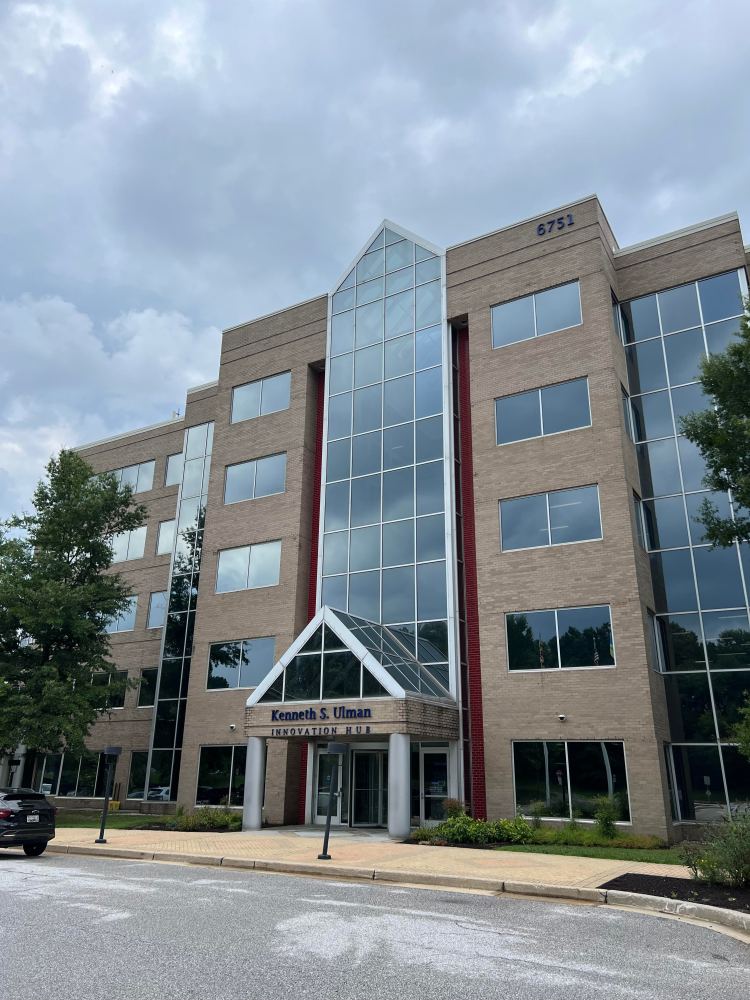
This is an overdue post on my productive visit last July 31 to tour the Maryland Innovation Center and get acquainted with its support programs and facilities for MD small businesses. MIC’s Jillian Joseph led me on a personal tour of the building as well as an explanation of all its resources.
MIC at a glance (brick-and-mortar)
Front Entrancde to the MIC Building
MIC is located at 6751 Columbia Gateway Dr, Suite 500, Columbia, MD , and is administered by the Howard County Economic Development Authority (HCEDA). The building is 60,000 sq ft innovation hub with coworking, private offices, classrooms/training rooms and event space.
The following outlines MIC’s key resources for small business:
Event/meeting spaces: Multiple modern rooms (e.g., “Platinum,” “Gold,” “Silver,” and “Accelerator” rooms) with A/V, flexible seating, and options for 40–130+ attendees; booking starts around $70/hr.
Vibe/amenities: Contemporary lobby and collaboration areas; high-speed connectivity; free parking (suburban campus); built for workshops, panels, and pitch events.
Programs for solopreneurs: tutorials, events & mentoring
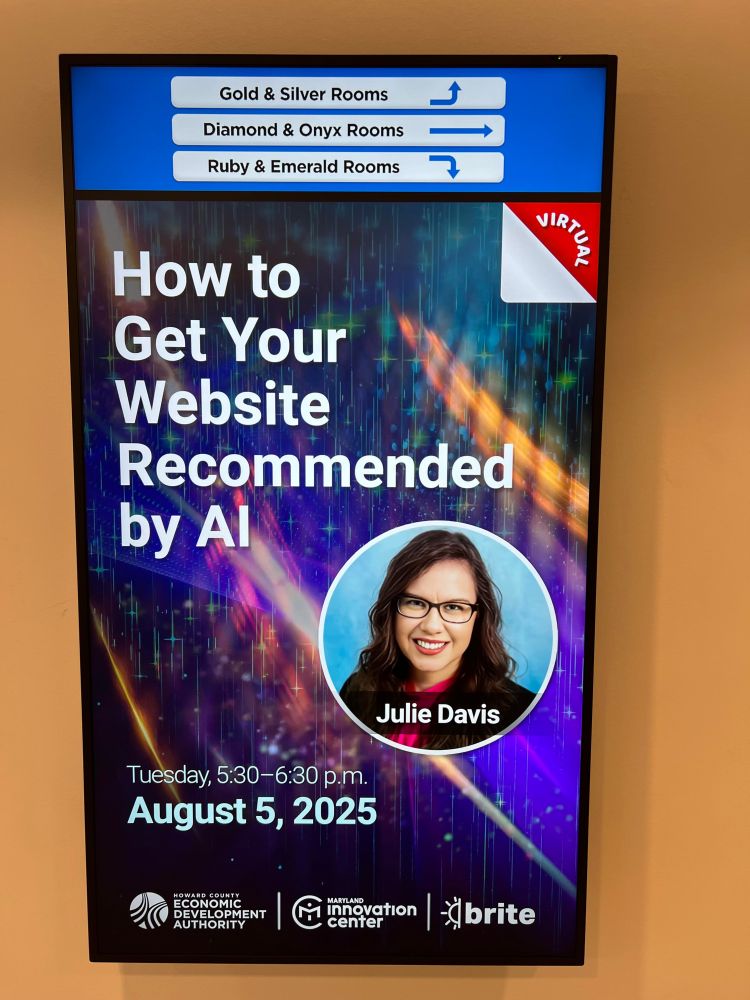
Workshops & tutorials: MIC runs frequent entrepreneurial training, educational workshops, panels, and pitch competitions; programming is listed on its Events page and HCEDA’s Eventbrite. As an example, see below the promotional poster for Julie Davis’ website webinar last August 5.
Virtual access: MIC hosts a recurring Virtual Open House to learn about services remotely; many sessions are recorded or offered as video for members. Eventbrite
Mentoring: Members can access Entrepreneurs-in-Residence (EIR) mentorship, plus curated investor and partner connections—an emphasis MIC highlights across its site.
The Business Revitalization Initiative Through Entrepreneurship program—or BRITE—accelerates the journey from innovation through commercialization. From mentoring to marketing, product development to pitching, BRITE provides early stage startups and seasoned businesses in Howard County with direct pathways to entrepreneurial success.
Open Work space at MIC upon entering
Membership & pricing (current “from” rates)
MIC publishes simple, tiered pricing (“starts at” levels):
Elevate (Coworking): $200/mo (coworking + conference room access, mailbox, e-signature, member benefits). MIC –
Amplify (Coworking + Mentorship): $300/mo (adds 1:1 EIR mentorship; access to video/podcast studio). MIC –
Empower (Dedicated office + Mentorship): offices from $550/mo (adds a private office, priority access to lounge/training rooms, expanded meeting access; application/interview required). MIC –
International (Soft-landing): $400/mo with counseling/mentoring for international companies. MIC –
Member perks: Discounts on BRITE classes (10–50%), HCEDA events, and more. MIC –
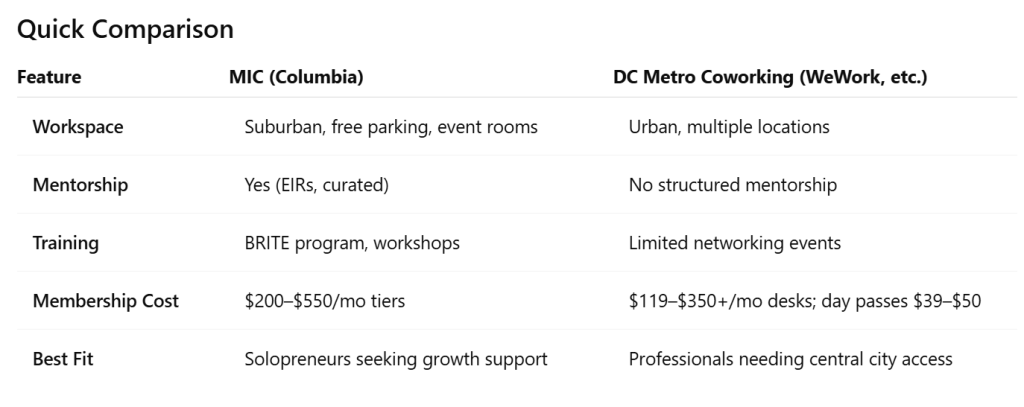
How MIC compares to WeWork & similar DC coworking
What MIC is: an incubator/accelerator + workspace backed by a county EDA—i.e., space plus structured programming (BRITE), curated mentorship (EIRs), investor/pitch pathways, and community partnerships. If you’re a solopreneur seeking education, mentors, and a startup network—not just a desk—MIC’s bundle is unusually robust for the price.
What mainstream coworking is: workspace-first with amenities and community events, usually à la carte for meeting rooms and no built-in mentoring. Examples/prices in DC:
Bottom line for a solo consultant:
Choose MIC if you want affordable space + structured growth support (classes, mentors, warm intros, pitch opportunities) under one roof. The $200–$300/mo tiers beat many DC coworking prices when you factor in mentorship and programming value, and the office-from-$550 path is a low barrier to a private office inside an incubator.
Choose WeWork/Industrious/Spaces if you mainly need flexible urban locations, day-to-day desk access downtown, or day passes near clients/metro, and you’ll source education/mentors separately.
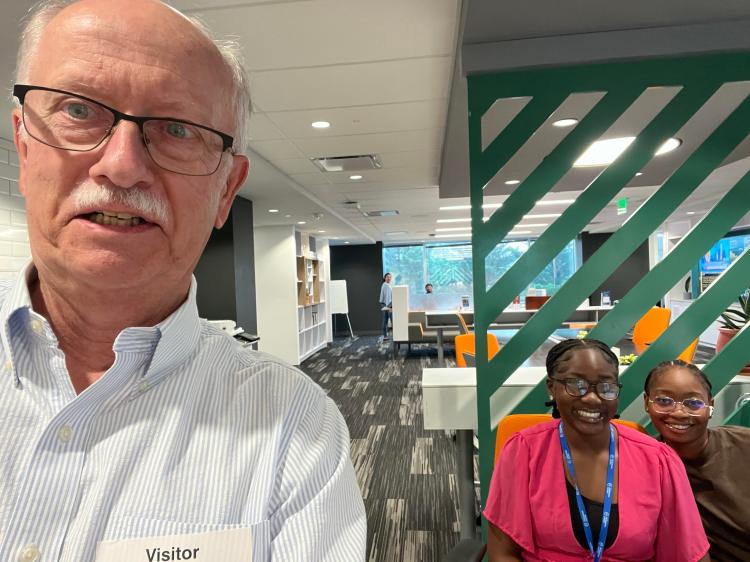
My selfie (and appreciation) for welcoming MIC staff at Reception
My thanks to Jillian Joseph and the MIC staff for a great tour of their facility, which may well be a great resource for my MD Solopreneur clients in future.
In recent weeks I have refocused my business, DCWebRevolution, away from general website design for small business and non-profits to a more targeted market of Washington D.C. area Solopreneurs (especially in services and consulting) who need simple, sustainable digital marketing tools and templates.
My new approach as “Digital Marketing Mentor”for Solopreneurs is summarized…..
I see these Fiverr Gigs or short-term tasks as building blocks for new DC area Solopreneurs who wish to start up (or rebrand) a solo consulting business, as their “next step” after a career in government or the private sector. My methodology is to help clients move from general business and marketing planning to production of online tools, media and websites, as shown below.
See the following brief descriptions of each of my dcwebrevolution Fiverr tasks or “Gigs. “
— Please address initial inquiries about my Fiverr Gigs to me via email at gary@dcwebrevolution.com or you can start a discussion on Fiverr via the “Contact Me” button on any specific Fiverr gig (which will lead you to create a free potential “Buyer” account on Fiverr). You are also welcome to call or text my cell at 703-899-9940 (just reference “dcwebrevolution Fiverr gigs”).
— Any Gig takes from just a few days to a few weeks to complete, and Fiverr helps ensure Buyer satisfaction! Note that Fiverr currently charges Buyers 5.5%, plus another $2 fee for small orders. See How the Fiverr process works for Clients.
Why?: A solid Business and Marketing Plan can focus your website content, sharpen Social Media outreach, and convert more web traffic to solopreneur sales
This Gig offers the following Packages:
Basic:Elevator Speech to capture essential branding & start networking!
Standard: Value Proposition Canvas to fit your service with customer need
Premium: Business Model Canvas, a complete, summary business plan
Why: A basic set of physical or virtual Freelance Marketing Tools focuses and enhances the impact of your online brand as a Solopreneur.
Let me expand Digital Reach, enhance personal Branding, and enrich your in-person Networking with these Freelance Marketing tools:
Basic: A Business Card with logo from a Vistaprint or Canva template as a basic branding statement with your contact information. Also Digital option.
Standard: A narrated PowerPoint/MP4 video as a digital Pitch for your product/ service is a powerful short message to market client prospects (see my Gig Videos on Fiverr!).
Premium: A custom paper Brochure choosing from 100s of bifold/trifold templates on Vistaprint (or Canva) provides more detailed, branded information. Note: Vistaprint printing and shipping for cards or brochures a separate cost for user.
I will produce the following on WordPress.Com or Google Sites:
a User-Friendly Website Design for solopreneur consultants or other services
Payments app (Standard) + Social Media integration for maximum online marketing
2 Video coaching sessions + site fine-tuning
Bonus:2 weeks free, added email support after any Gig completion!
I look forward to your comments, questions and feedback!
Heads Up! For my next Post on “My Rebranding”…..
I plan to share my story on why I decided to rebrand my business from web design to digital marketing, what advice I got from friends, family and Chamber colleagues, and what sequential process I am following in my rebranding testing and deployment I will also note online models, tools and tutorials I consulted, and plans for my own website’s redesign. The article will close with tips from my experience and resource links that should help others who wish to rebrand (or start from scratch) their own Solopreneur business, esp in the DC area. ….So say tuned!
Did you know that Dog Beach in San Diego CA was the first beach in the 1970s in the US to allow dogs to roam free without a leash! It sure makes sense to me given the laid back CA vibe! But enough about dogs and beaches, and more to the point of this continuing AI chronicle: U sing ChatGBT to solve a practical purchase of a computer desktop microphone…..
Case 1: Using ChatGBT to Purchase a Microphone
A. GBT Question or “prompt”:
I want to improve sound quality for an audio-narrated slide deck of 5 minutes long. What equipment or software do I need to buy in addition to my PC and iPhone?
B. GBT Results:
Essential Equipment
USB Microphone (for PC)
Recommended: Blue Yeti, Audio-Technica AT2020USB+, or Elgato Wave:3
Why: Offers much better clarity and noise reduction than built-in mics
Pop Filter or Foam Windscreen
Prevents harsh “P” and “S” sounds and softens breathing noise
Mic Stand or Boom Arm
Keeps mic steady and positioned correctly, avoiding desk vibrations
Optional: External Audio Interface (if using XLR mic instead of USB)
Focusrite Scarlett 2i2 is a popular choice
Only needed for more advanced setups
Recording Tips
Record in a quiet room with soft surfaces (carpet, curtains, etc.)
Keep mic 6–12 inches from your mouth, slightly off-center
Speak clearly and steadily, then edit out mistakes or breaths
C. Next Steps:
I did a Google Search on the 3 equipment options, and also ran across Reddit user feedback on Blue Yeti vs other alternatives.
I then tentatively selected Blue Yeti as the lowest cost most versatile option, and went to Amazon to check availability and their customer reviews. Lastly in my Google Search I found an expert blogger (at
P.S. I also did further iteration on ChatGBT, for example…what are software recommendations for better audio recording? In fact I could have further iterated or drilled down on GBT to get individual reviews of each equipment option, etc vs following up on Google Search.
I attended in person a number of excellent sessions plus later viewed other virtual presentation recordings. These included a total of 5 sessions about AI which I plan to discuss further in future website blog posts. I learned a lot about how to use Chat GBT, Google Gemini and other AI tools as practical aids to my web design consulting business with both solopreneur and small non-profit clients.
I conducted a subsequent AI “experiment” during an early morning break of no more than an hour (with interruptions!) during a recent family vacation trip to San Diego, where we stayed at an Air B+B in the hippie Ocean Beach area, with ready access to Dog Beach . We visited there to catch the sunset, see a young Dad supervise his little girl in the sand, and watched as dogs of all shapes and sizes roamed free without a leash and cavorted all along the beach! This Beach and the relaxing vibe in San Diego was my inspiration to try ChatGBT…hence this post’s image and subtitle – which, of course, were AI generated!
Here is how I went about testing ChatGBT:
1. Spontaneity: I was relaxing on a couch using ChatGBT on my iPhone – a good example of the handy, informal, 24×7 nature of this AI resource!
2. Questions: in my two use cases I posed a real business question that I wanted advice on, adding context and specificity with question “prompts”.
3. Iteration: I then refined my original question with other conditions
4. Comparison: upon obtaining (in seconds!) a good Chat GbT answer, I further used Google Search and other reference sites like Amazon to check or follow up on the AI result.
5. Decision: Make a decision on how best to edit/apply the AI result.
In subsequent posts on these “Dog Beach AI Chronicles”, I would like to share my two early ChatGbT use cases:
1. to get recommendation for a microphone to improve audio recordings on my PC, and
2. to generate a rebranded elevator pitch for my web design business.
I will then conclude with final lessons learned and thoughts on my future expanded business use of AI as a Solopreneur.
NOTE: in my later use of ChatGBT…
it is amazing the range of questions the app can answer: providing feedback in the form of well written text, generating customized images, and even suggestions for free music clips to accompany social media or blog posts!
The challenge is to discipline one’s use of AI – either by immediately applying the ChatGBT answer to a draft document, blog or social media post, or by organizing various AI responses in a document form for later reference.
It also helps to start questions on different topics as separate ChatGBT queries, thus making it easier to locate queries and replies on this app’s Library.
Your feedback or comments on these posts most welcome!
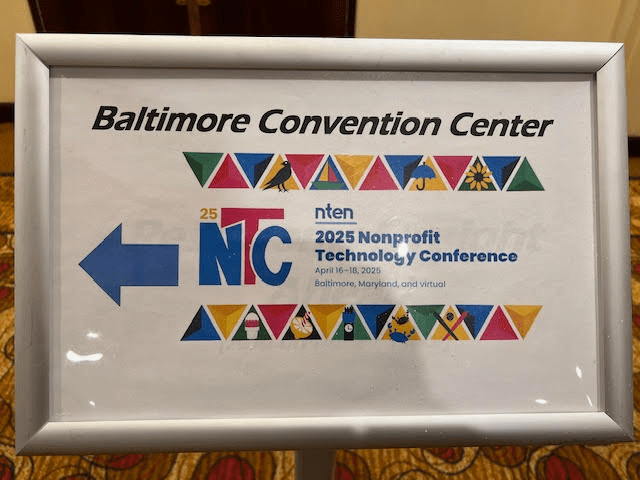
I enjoyed attending the Nonprofit Technology Conference (NTC) in Baltimore MD last Wednesday through Friday, 4/16-18 of 2025. It was hosted by the non-profit NTEN (based in Portland OR) and was well attended by around a thousand nonprofit representatives and private consultants. I was impressed with the breakout sessions and keynotes, and I had some great conversations with both attendees and sponsors. This year’s format offered the option one day to make a 15 minute appointment and speak individually with an array of sponsor consulting firms, and I got a variety of useful tips re SEO, branding, web design, social media, or non profit market conditions.
Held at the Baltimore Convention Center, this event did not have as fancy food, exhibits or SWAG as some of the WordPress conferences I have attended. However, the quality of all presentations was excellent, and NTEN offers attendees access for another 3 months on their platform to recordings of all the sessions, including several I flagged but was not able to attend. While this event did mention WordPress in a few talks, by and large it was tech agnostic and covered a variety of tools and apps, esp their relevance to the non profit community.
Elements of the conference were very informal: groups of folks with common interests (“Birds of a Feather) or Meetup groups (one on WordPress, another on Non profit Tech) seated on couches or scattered around chairs and tables. I came late to a couple of these sessions of interest, but found it difficult to break into a convesation – I think the secret is to try and come early to a session of interest, or to just be bold and strike up a conversation on the fringe!
Last Friday I posted on Facebook my 5 minute video recap of highlights of the conference. Over the next several weeks I plan to share on my Blog reviews of the best breakout sessions (grouped by common themes) that I attended. Here are their titles and summary reference links below (in order of presentation at the Conference) :
ATTENTION all my Blog Subscribers and Social Media Connections!
Are you thinking of starting a new small business?
Might you have an existing small business, but need to boost your online planning and marketing?
I have answered these questions myself as a new Solopreneur! In 2022 I retired from full-time work as an IT contractor with the State Department in Washington DC, and in 2023 – 2024 I completed my transition from Government Contractor to part-time Solopreneur and member of the Gaithersburg-Germantown Chamber of Commerce.
I AM ALSO HERE TO HELP YOU! Check out my quick, economical Fiverr Gigs…with their new 2025 low prices good through February 2, 2025 (Groundhog Day!).
See four quick “Gigs” or tasks where I can assist in planning or jump-starting your own small business. All these Gigs are processed through the online freelance marketing site called Fiverr (which you may also wish to explore as a “Seller” for your own small business!). For an explanation of what the competitive Fiverr platform is, why useful, and how to access, see my past Blog article.
My basic Fiverr services (under “dcwebrevolution”) are as low as $20 and most are doable in about a week.
Click on the links below to see these Gigs and their “Basic” packages. Note that your first step will be to Create a New Account as a Fiverr Buyer. This registration is at no cost to you – just submit your email address and a Password, and briefly message me wIthin Fiverr about your Gig interest:
Online Business Planning Gig:let me walk you through starter business planning steps with my Lean Business Planning Basic package at $30.
User-friendly Website Gig: I can get you started with a new WordPress.Com website and provide basic tips on how to launch and maintain your site – for only $100.
Website Design Audit Gig:If you already have a small business website, regardless of your software or platform, I can do a quick site audit, with a focus on how to improve your design, searchability and quality content – at just $25.
Key Freelance Marketing Tools Gig:To get your small business off to a good start, I can guide you through setting up a business card on a Vistaprint template, and then teach you how to later update the card on your own – only $20.
And all my Fiverr Gigs include an extra, free 2-week follow-up support by email!
The FAQ section in each Gig provides more information about the task and various “package ” options (Basic, Standard or Premium).
You are also welcome to just email me at gary@dcwebrevolution.com with any questions and how to access any Gig on Fiverr.
I recently listened to a WP.COM webinar on AI-Assisted WordPress. For example, it provides some good tips on how to use an AI-embedded block in your blog post to enhance idea generation, improve readability, and speed up drafting. This AI tool is built on another WP.COM plugin called Jetpack, and is available for all WordPress.Com sites, but limited in its usage on their free sites. A key skill for using the AI tool most effectively is to ask it explanatory or leading questions in the form of text “prompts.”
The Webinar presenter gives some specific examples on how to use the AI tool within WP.COM to get feedback on how to improve an existing Post, and to generate content for a demo coffee tasting blog, and then quickly format such areas as a coffee tasting table within the post. He also uses AI on Pages, for example, automatically generating a Contact Form or an FAQ Page.
See below an example of my using this WP AI tool to answer the following broad question that I posted in the prompt: “Give a brief description of what are Artificial Intelligence tools and how they might apply to website design and maintenance?”:
Artificial Intelligence (AI) tools refer to software systems that leverage algorithms and data to perform tasks that typically require human intelligence. This includes capabilities such as understanding natural language, recognizing patterns, making predictions, and automating processes.
In the context of website design and maintenance, AI tools can enhance both the user experience and the efficiency of the development process. Here are a few applications:
Personalization: AI can analyze user behavior and preferences to create personalized content and recommendations, enhancing user engagement.
Design Assistance: AI tools can assist designers by suggesting layout options, color schemes, and typography based on current trends and user preferences.
Content Generation: AI can generate articles, product descriptions, or even entire web pages based on given keywords and topics, saving time for content creators.
SEO Optimization: AI tools can analyze web pages to provide recommendations on optimizing for search engines, helping to improve visibility and traffic.
User Support: AI-powered chatbots can provide real-time support to visitors, answering questions and assisting with navigation, which enhances user satisfaction.
Performance Monitoring: AI can continuously monitor website performance, identifying issues such as slow loading times or broken links, and suggest improvements.
By integrating AI tools into website design and maintenance, businesses can streamline their processes, enhance user experiences, and adapt quickly to changing needs in the digital landscape.
I would welcome any User feedback on my blog article, or your own experience with AI such as the WP AI tool or Chat GBT in blogging or other fields!














 New Solopreneur Transition